Why is my Composer Power-up returning a CORS error?
Question
Why would a Composer Power-up return a CORS error?
Answer
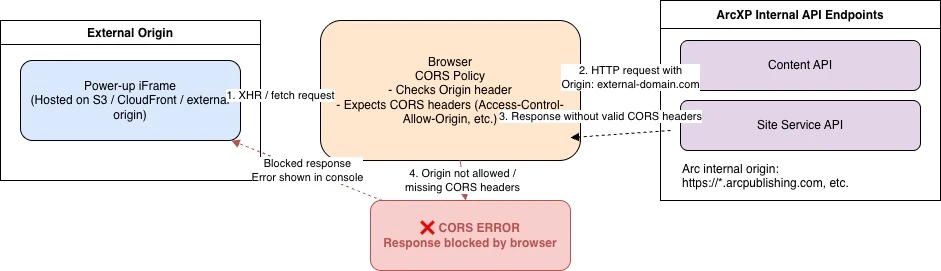
To access data stored in Arc, ensure the Power-Up is created and hosted under your Arc domain (e.g., https://{org}.arcpublishing.com). If the Power-Up is hosted on any other domain, the browser will treat it as a different origin from the ArcXP APIs (which also use {org}.arcpublishing.com as the base domain), resulting in CORS errors.
Never call ArcXP API endpoints directly from a public Power-up/iframe. Doing so can expose authentication tokens in the client and introduce a security vulnerability, in addition to CORS issues.
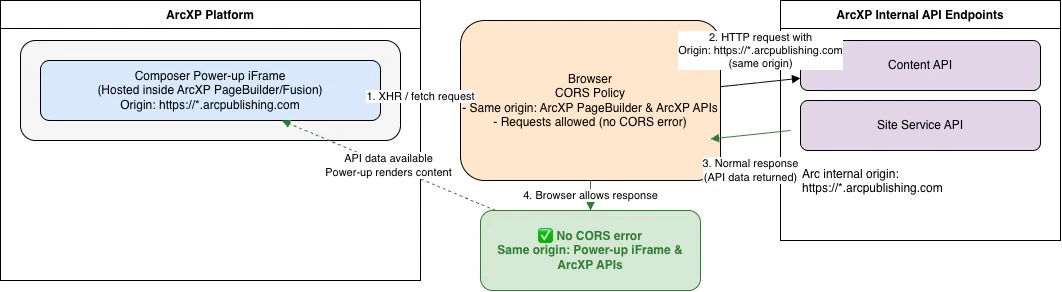
To access data stored in Arc, ensure the Power-Up is created using PageBuilder/Fusion—either as a static file in /resources/plugins/composer or as an outputType, you should only access Arc XP APIs through content-sources. Direct API calls from the Power-Up (even when internally hosted) can expose authentication tokens and introduce security vulnerabilities, in addition to CORS issues.
More Information
| Arc XP University Getting Started with the Custom Embed Power Up in Composer Technical Specifications for Custom Embeds (Power Up) in Composer |