# Excluding pages from search engine results
Source: https://docs.arcxp.com/en/products/content/excluding-pages-from-search-engine-results.html
You can remove or block pages from appearing in search engine results by adding a `noindex` tag to the code of the page. The `noindex` tag is a meta tag that signifies to search engines not to index a page in the search results.
For example, you might want to hide a landing page or remove low-quality or thin content from the search results.
When adding the `noindex` tag to your pages, ensure Google can crawl the page and is not blocked from crawling in your `robots.txt` file.
You must add the `noindex` tag to the `` section of your page. The following rule notifies all search engine crawlers to not index your page:
```html
```
To implement the `noindex` meta tag within Arc XP, you must perform some development to detect whether a page should be no-indexed or not.
The recommended solution is to use labels to identify which story you want to noindex.
1. In Arc XP Composer, open Composer Settings and ensure kickers/labels is available in the **ANS meta field configuration** section.
2. Scroll to the [Kickers/Labels](https://docs.arcxp.com/en/products/composer/getting-started-with-composer/how-to-use-kickers-and-labels.html) section to create your label type.
3. Name your kicker/label.
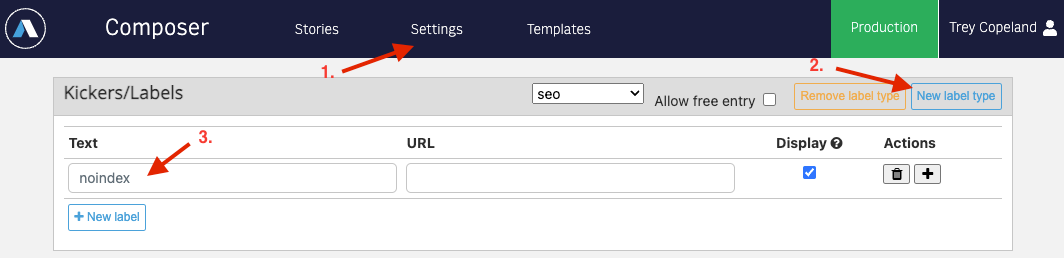
4. Navigate to the Meta tab, scroll to the Kickers/labels field, and click the name of the label you created.
5. In your bundle code, use the following sample code to check for the `noindex` kicker/label. If a story includes the `noindex` kicker/label, this code snippet adds the `noindex` tag to the story’s `` section, excluding it from search engine results.
```javascript
const pageType = metaValue("page-type");
const seoLabel = globalContent?.label? globalContent.label.seo.text : "";
if (pageType === "article" && seoLabel === "noindex") {
return (
<>
)
}
```
> **Note:**
>
> This is a basic example of how the kickers and labels could be used to add a noindex tag on your story page. You might have to customize it to fit your specific needs.
For more information on how Google treats the `noindex` tag and other SEO basics, refer to the [Google Search Central documentation](https://developers.google.com/search/docs/crawling-indexing/block-indexing).
To learn how to block your non-production website from search engines, read [What’s the best way to make sure our non-production website is hidden by search engines?](https://docs.arcxp.com/en/knowledge-articles/administration/what-s-the-best-way-to-make-sure-our-non-production-website-is-hidden-by-search-engines-.html).